Trade assumptions
Do not copy a week until expected trade is checked.
- Opening times
- Events or weather
- Wet and food mix

This guide shows cafe operators how to structure the week before moving the same thinking into RotaSmart's live planning view.
Do not copy a week until expected trade is checked.
Show where the week needs people by role or area.
A useful template includes cost and constraints.
Events, staff changes, and actuals quickly make static copies stale.
Managers need cost visible while editing, not after the rota is shared.
Templates do not handle approval, swaps, clock-in, or sign-off.
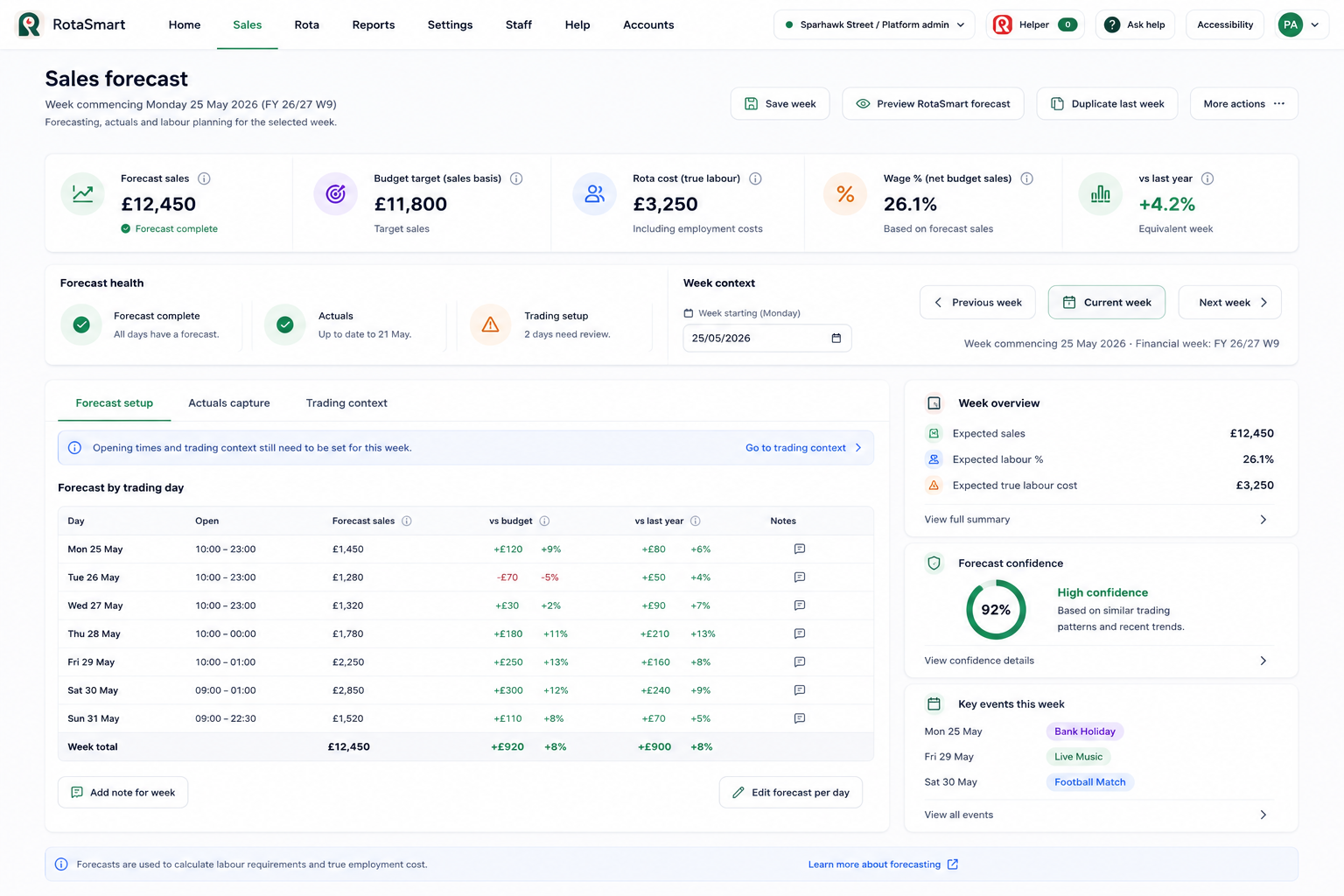
The sales forecast screen makes quieter periods, key events, forecast confidence, and wage percentage easier to review.
Hospitality rotas change quickly, and managers need a simple way to connect trade, cover, cost, and people decisions before the week goes live.
Mark breakfast, lunch, prep, and close-down windows.
Place cover around the real trading day.
Check hours and wage percentage.
Share the rota and keep changes controlled.
Cafe demand often moves by daypart, with prep and close-down work mattering as much as service cover.
Yes. It helps managers see where cover is heavy before the week starts.
In RotaSmart, staff requests can move through RotaSmart Team with manager approval.
Bring a real week and review forecast, labour plan, rota cost, wage % and staff flow.
 RotaSmart Team